
What is GetTik?
GetTik is a browser-based TikTok downloader built on Laravel. It lets you download TikTok videos without a watermark, prepares the best available MP4, and gives you a temporary download link without a cluttered multi-step process.
Paste a public TikTok video link, preview the video details, and download TikTok videos without a watermark in the best available MP4 quality.
Supported formats: public single-video links from tiktok.com.
GetTik is a browser-based TikTok downloader built on Laravel. It lets you download TikTok videos without a watermark, prepares the best available MP4, and gives you a temporary download link without a cluttered multi-step process.
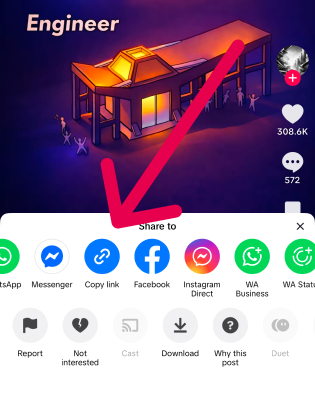
Open TikTok and copy the public video link you want to download.
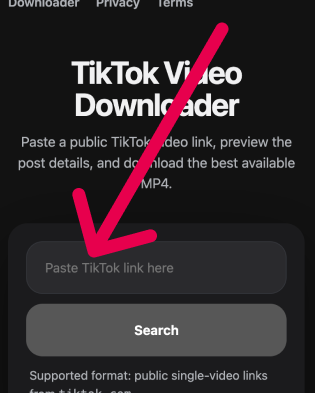
Paste the copied TikTok URL into the field above.
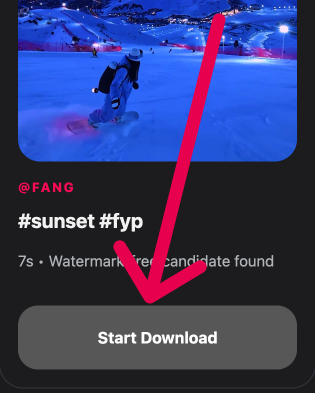
Click the download button and save the TikTok video in MP4 to your device.

Paste a public TikTok link and start the download flow without creating an account, signing in, or installing anything.

The service generates an MP4 file for each request and automatically selects the best available quality.

Paste the link, preview the video, and start the download automatically in a clean browser flow without extra redirects.
Use GetTik on desktop or mobile browsers, including iPhone, Android, Windows, and macOS, without app installation.
See the TikTok thumbnail, author, and description before you download the file.
Once the MP4 is ready, the browser download starts automatically without an extra click.
Prepared files are temporary and removed after the configured retention window.
When TikTok provides a clean version, the downloader prioritizes it before falling back to the best available stream.

Save your own public TikTok posts quickly for reuse, backups, reposting, or cross-platform publishing.

Collect approved public TikTok assets for reporting, moderation, campaign planning, and content workflows.

Download reference clips for editing queues, moodboards, and short-form video production research.

Archive public video examples for analysis, documentation, trend tracking, and content review.
Best for watching, sharing, and saving TikTok videos in a standard format supported on most devices and browsers.
Need audio only? Use the MP3 page to convert TikTok to MP3 and download the audio track separately.
tiktok.com. Profile feeds, playlists, slideshows, and private posts are out of scope.